Helium 10 Review (2026) – New Features & Plans (My Verdict)
At the start, I struggled a lot to use its tools. So, there is definitely a learning curve.
Recently, they have made some major changes in their pricing and features in 2026 update, so it will be exiting to see if it is worth the price.
🔥 Get 20% Off On Helium 10
Use our exclusive link to activate the offer and save 20% on Helium 10.
TL;DR Helium 10 Review: In A Nutshell

Lifetime 10% OFF
(save 10%) (All Plans)
Who Is Helium 10 For?
Helium 10 is built for businesses of any size. But ideally, sellers with high sales volume prefer the tool the most. Its advanced tools and cutting-edge metrics can be overwhelming for those who are just starting out.
Who Should Not Use Helium 10?
Helium 10 is undoubtedly a powerful tool, but it is not the perfect fit for every business. Here are some examples of individuals & businesses that should avoid picking Helium 10:
- Businesses that are not listing products on Amazon or Walmart.
- You are completely new to Amazon with no prior knowledge of basic selling practices.
- Running a business on a low budget
- You are not familiar with analytics, or not very tech-friendly
- Running an arbitrage or dropshipping on Amazon business
- Your main focus is brand advertising
Helium 10 Overview – How Does The Tool Look Like In 2026
Helium 10 is an all-in-one software platform built especially for Amazon and Walmart sellers. It aims to help them build and grow their online selling businesses. This software suite caters to SMBs and enterprises by providing them access to 30+ exclusive seller tools.

These tools help you find winning products, create high-converting listings, run profitable ad campaigns, and make data-driven decisions. Combining all the tools into a single suite, Helium 10 eliminates the guesswork and manual work involved in building a successful Amazon FBA business.
Some of the standout benefits of Helium 10 include:
- Absolutely accurate data and forecasts to validate product ideas before investing money into inventory
- Competitor intelligence to benchmark your listings and inform pricing/promotion strategies
- Advanced keyword tracking for both organic and sponsored products
- AI-powered listing builder for optimized titles, bullets, descriptions, and backend keywords
- Robust advertising platform to create and manage PPC campaigns
- Inventory management tools to avoid stockouts and replenish at optimal times
These exclusive features are only available with the paid plan. Use our coupons DEMANDSAGE10 or DEMANDSAGE20 to save on monthly plans.
Is Helium 10 Accurate? Know What Our Tests Say
Sellers trust Helium 10’s tool for its reliability and unmatched accuracy. It’s common that database metrics, such as pricing, fulfillment, keywords, and product dimensions, are directly extracted from sellers’ listings on Amazon, so they are 100% accurate.
On the other hand, estimated metrics and predictions were slightly up and down compared to actual sales.
To test its accuracy, I ran the Helium 10 Chrome extension on Learning Resources 3060, a product on Amazon.
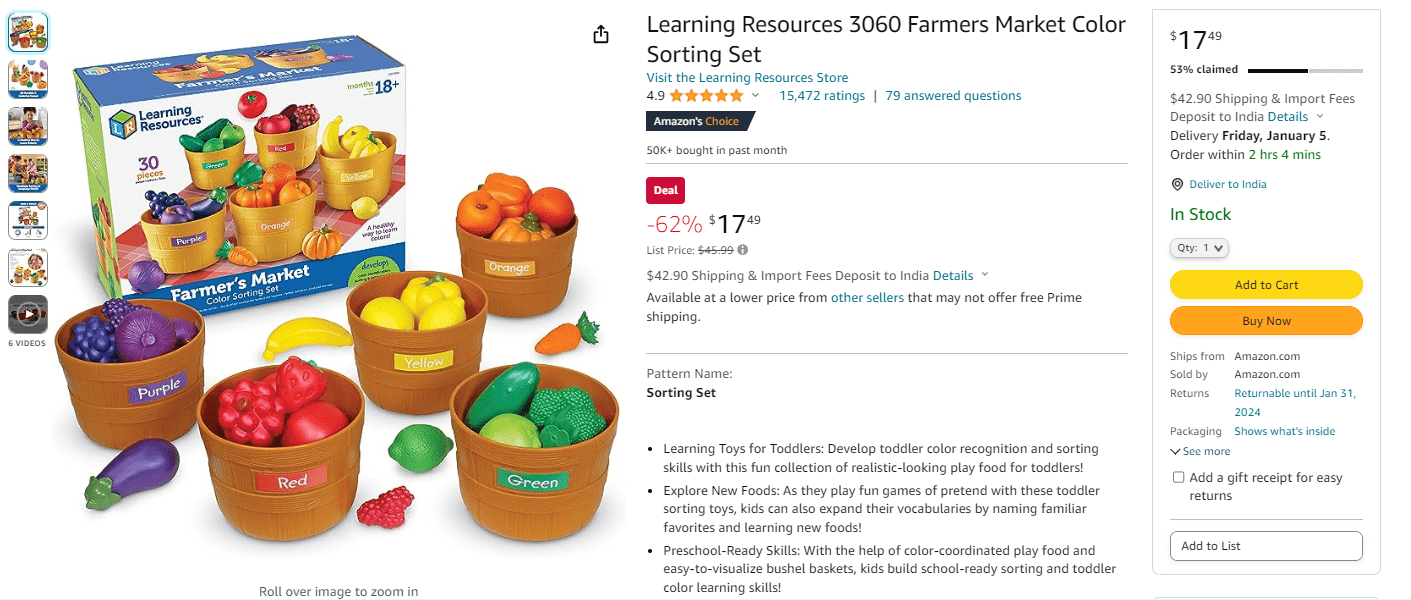
The common data and metrics related to the products were all correct. However, the 30-day sale was showing around 56K, but the actual sales were 59K when checked from Seller Central.
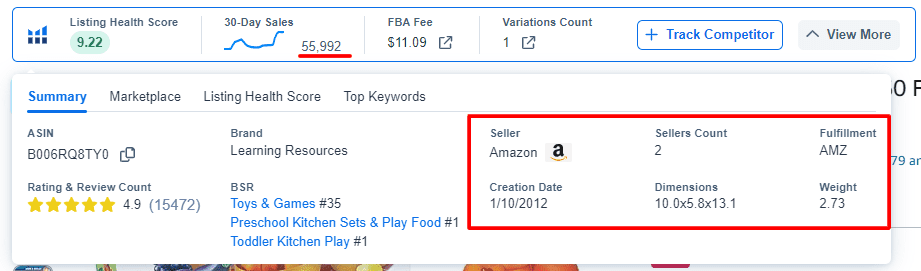
The difference in ratings and reviews was very minimal, as Helium takes a few hours to update real data from Amazon.
The same happened with other products when tested along with other tools like Jungle Scout. However, Jungle Scout was a little bit more accurate than Helium 10 in many fields.
Let’s see how accurate both tools were when compared side by side:
| Amazon Tool | Sales Estimates | Monthly Revenue | Historical Sales | Best Seller Rank |
|---|---|---|---|---|
| Helium 10 | 78% | 79% | 86% | 99% |
| Jungle Scout | 83% | 81% | 80% | 98% |
My actual tests show Helium 10 was 79.3% accurate, while Jungle Scout was 84% accurate. However, Helium 10 is reliable with its data and accuracy, so you can trust the tool.
Find out more with our detailed Helium 10 vs Jungle Scout comparison and get to know which tool is better.
Helium 10 User Interface And Ease of Use
Over the years, Helium 10 has kept experimenting with its interface to provide seamless navigation for users. The old dashboard was cluttered. All the tools were in one place, with no proper categorization.
The new and improved dashboard is intuitive and easy to navigate. Even if you are a beginner, you will find a “Dashboard Training” option that will guide you through every section under the dashboard.

When you click on the Tools option from the top menu, you will find that every tool is properly categorized. Depending on your needs, you will know which feature to click on.

Not only that, all the Helium 10 tools come up with a training tutorial guided by Bradley Sutton (Chief Evangelist of Helium 10).
If you want a seamless Amazon operation and to check your day-to-day analytics, I suggest connecting your Amazon account with Helium 10. Connecting your Amazon Seller Central will help you manage your inventory with its cutting-edge AI technology.
Key Features Of Helium 10
Helium 10’s tool suite is well-arranged so that sellers can use it in a structured way. I will review all the major tools, explaining every good and bad aspect. This way, you can start with Helium 10 if you are building an Amazon business from scratch.
1. Product Research
As a beginner seller, the first instinct is to find the perfect opportunity to sell on Amazon. Finding a winning product can be a tedious task, but Helium 10 offers two product research tools, Black Box and Trendster, to make this process easy.
Black Box
Black Box is Helium 10’s primary product research tool. When you open it, you will instantly find a bunch of filters for advanced product research.
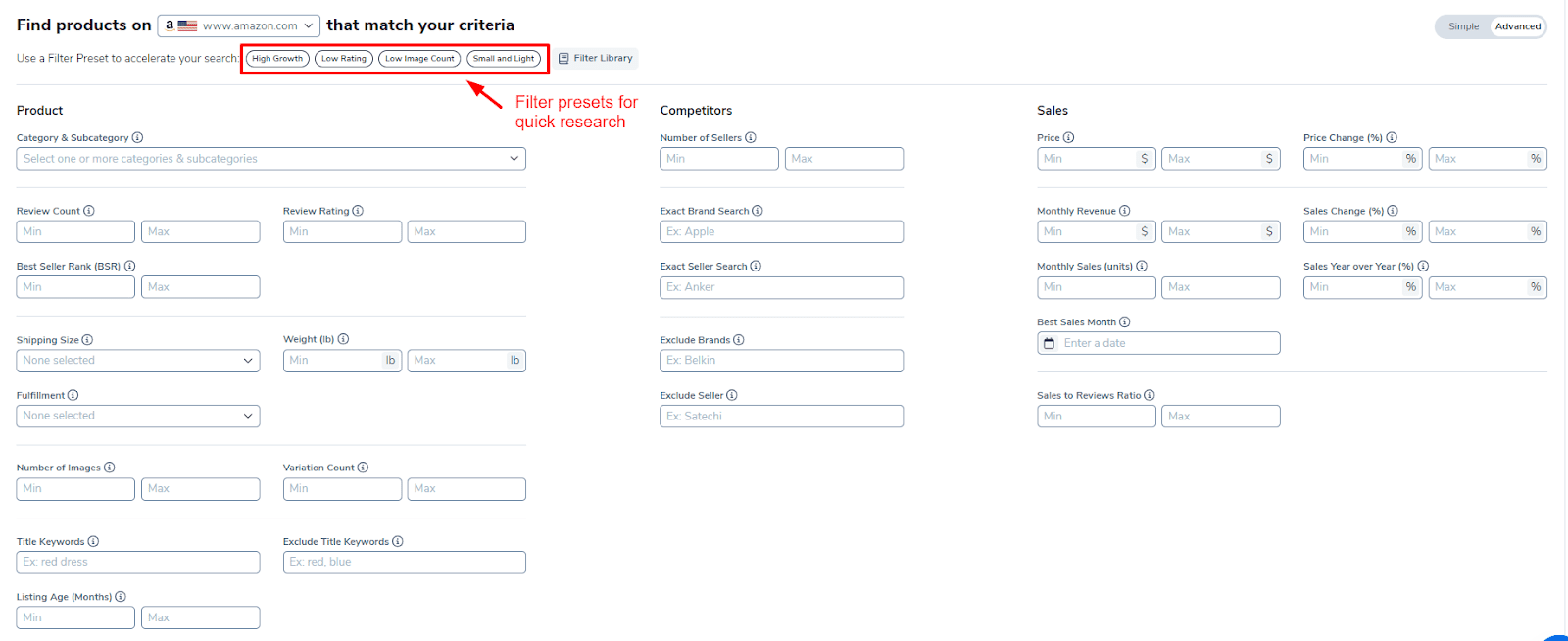
You can start by picking your preferred marketplace and category you want to sell in. Next, you can use filter presets on top to find products faster.
Moreover, you can also toggle the Simple filter if you don’t want to fill in all the sections that you are unaware of.
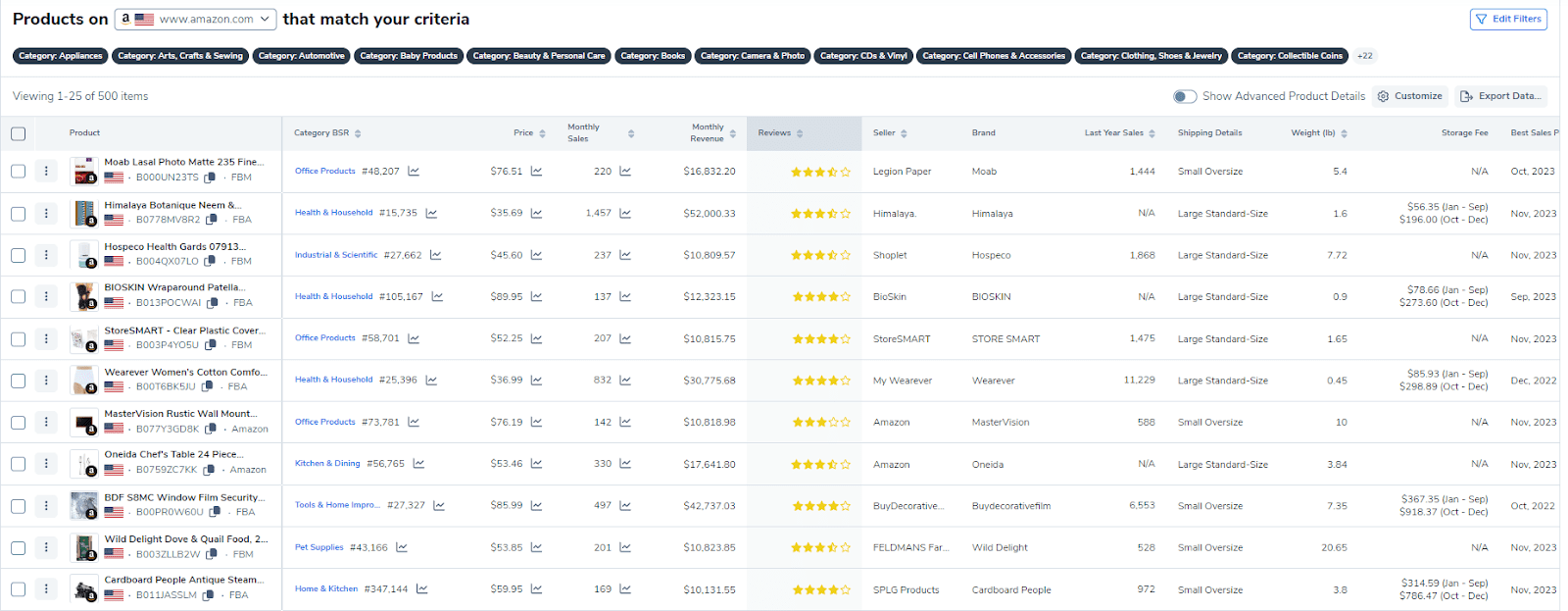
As soon as you hit the search button after filling in the filters, you will get a list of potentially profitable products. With that, you will also get metrics like:
- Category BSR: Best seller rank in category and sub-category
- Price: Historical price with trends
- Monthly Sales: Average monthly sales
- Monthly Revenue: Average monthly revenue
- Reviews: Review count and ratings
- Seller: Seller name and number of sellers selling the specific product
- Other Product Details: Brand name, shipping details, storage fees, product age, images, variations, etc.
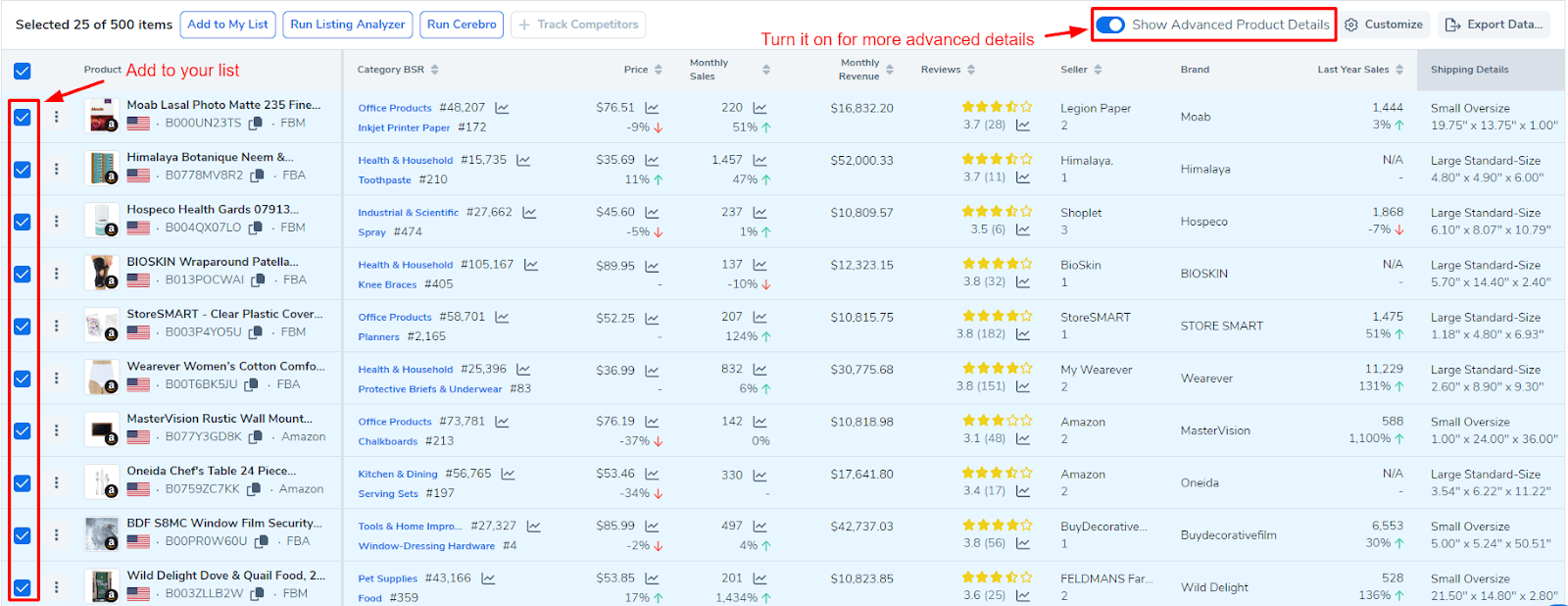
You can also switch to “Advanced Product Details” to get advanced metrics and sales stats of each product in the list. Once assessed carefully, you can add potential products to your list.
Note: With the new update, Helium 10 removed Trendster from its tool suite.
Product Launchpad
Helium 10’s Product Launchpad is an innovative tool that integrates all aspects of product research and launch planning into one centralized dashboard. It integrates data from various Helium 10 tools, such as BlackBox, Magnet, and Cerebro, allowing you to track keyword research, competitor analysis, and market trends in one place.

Product Launchpad is divided into three key stages:
- Keywords: Organize and analyze up to 2,500 keywords per product idea.
- Competitors: Add and track competitor products, viewing data like estimated monthly sales, revenue, and price history.
- Idea Scorecard: Receive AI-generated insights and recommendations based on your research data.
The tool also includes a Notes section for each stage, allowing you to record important observations and insights. The AI analyzes all this data to provide an idea scorecard, helping you make informed decisions about product viability and launch strategies.
My Verdict: Black Box is great for finding sustainable products, but too many data metrics can be overwhelming. The simple filter is great for starting out, but make sure to add essential filters to avoid irrelevant products. On the other hand, Trendster is great for accelerating sales on specific occasions, but it is not ideal for finding long-term products.
Product Launchpad also adds significant value to Helium 10’s product research toolkit. It streamlines the entire product launch process by consolidating data from multiple tools and providing AI-driven insights. This feature particularly benefits sellers who want a more organized and data-driven approach to product launches.
2. Magnet – Keyword Research
Once you’ve identified a product opportunity to pursue, Magnet makes it easy to discover the top keywords and search terms driving traffic and sales for that niche. Rather than manually analyzing listings and guessing keywords, Magnet shows you the exact terms your competitors are already ranking for.
You can start by entering a seed keyword (related to the products you picked with Black Box) and clicking Get Keywords.
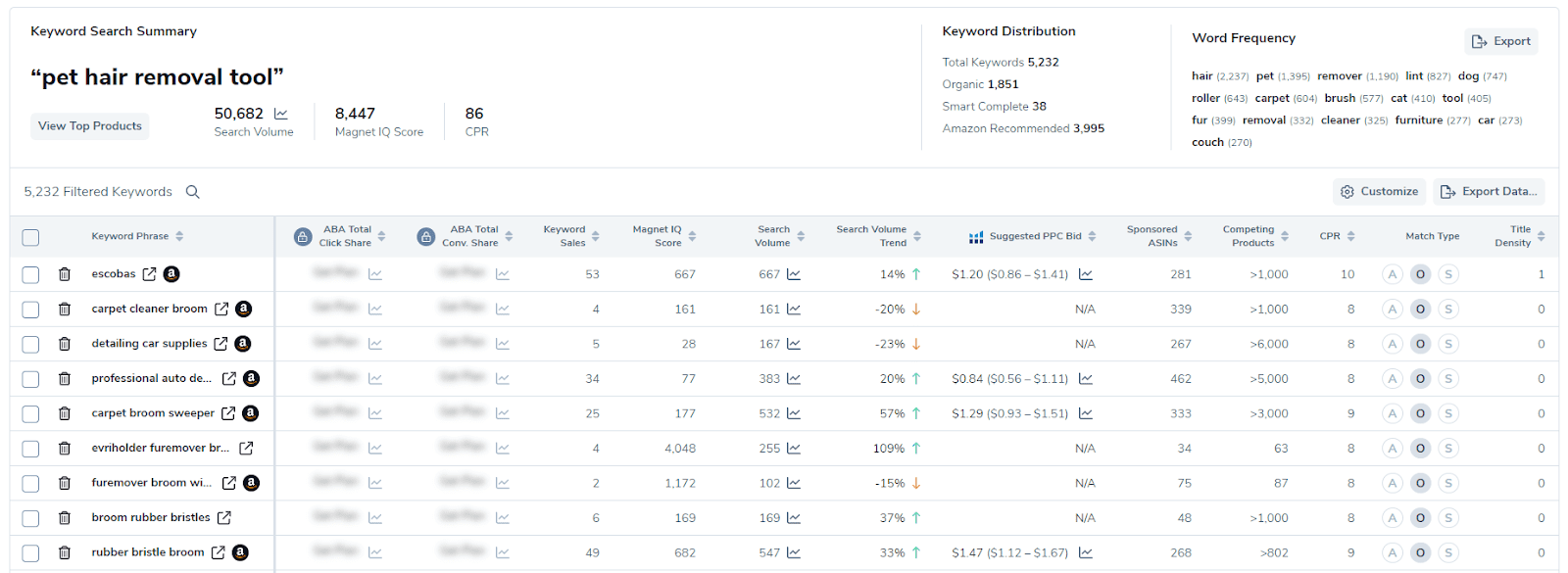
The Magnet tool will come up with a keyword list including these filters:
- Magnet IQ Score: The ratio of estimated search volume vs. the number of competing products. A high score indicates it is ideal for picking the keyword.
- Search Volume: The estimated number of monthly searches
- Competing Products: total number of products returned in a customer search using this keyword/phrase.
- Phrases Containing: shows phrases that contain the entered keywords.
- Title Density: number of products from page 1 with the searched keyword in the product’s title
- Match Type: Organic, Smart Complete, or Amazon Recommended
- Search Volume Trend: 30-day trend
You can select and add potential keywords to your list. For better keyword selection, you can analyze those keywords like this.
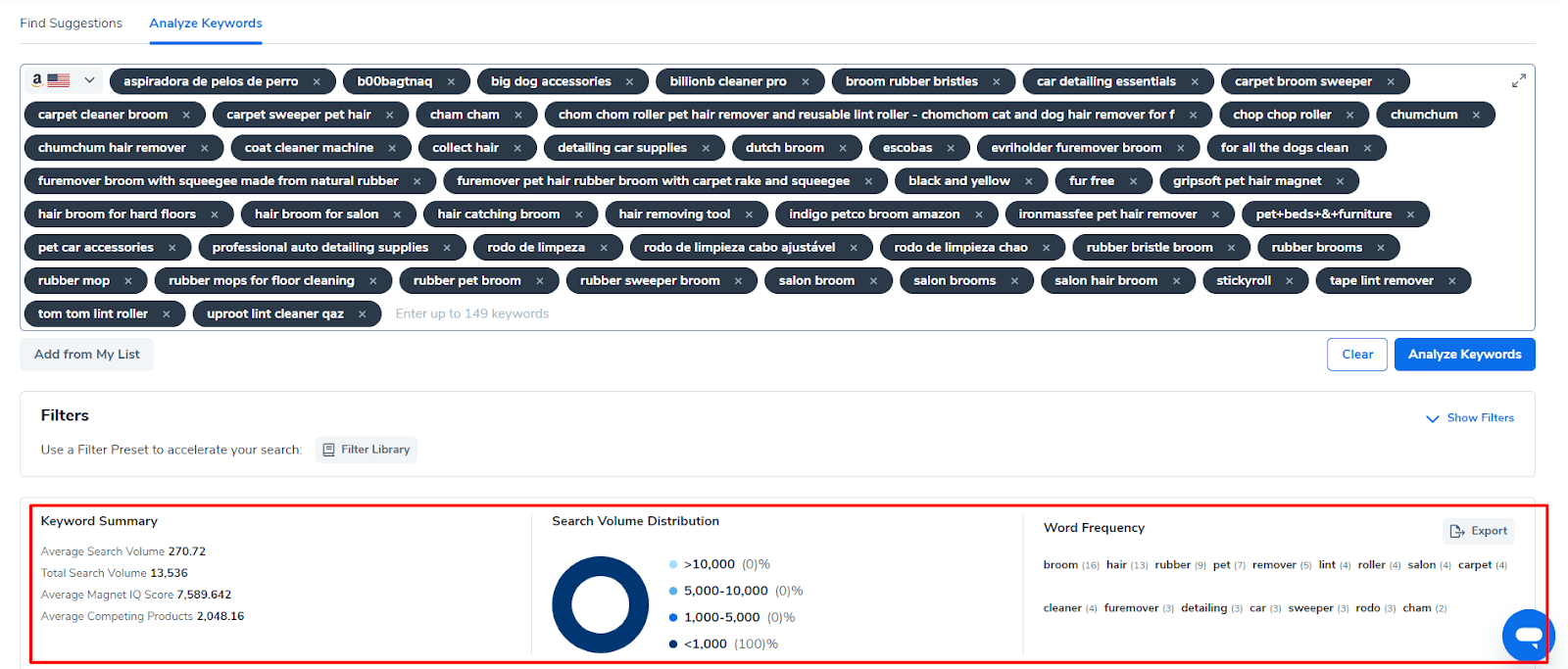
From there, you can select the keywords that best align with your product and business to inform your content strategy and PPC campaigns. After considering search volume and word frequency, you can remove similar and low-performing keywords from your list.
My Verdict: Magnet connects directly with Amazon’s database to provide accurate search volume data for both individual keywords and long-tail variations. However, not all the keywords are good for your listing or PPC. So, make sure to filter out non-performing keywords.
3. Cerebro (Now Use Along with Magnet)
While Black Box allows you to filter Amazon’s catalog based on product traits like size, reviews, and more, Cerebro works in reverse, compiling critical data on existing listings to assess viability.
Also known as reverse ASIN lookup, Cerebro provides a snapshot of monthly sales, historical Best Seller Rank, sponsored ad data, estimated revenue, rating breakdowns, and more for any listing. These insights allow you to perform competitive analysis to benchmark your listings against top performers in any niche.
On Cerebro, you can enter up to 10 ASINs of your competitors’ listings and get their top-performing keywords.

All the keywords in this list are categorized according to whether they are paid or organic. These keywords will validate your product opportunity and give you an exact idea of how many sales you can get if you add these keywords to your listings.
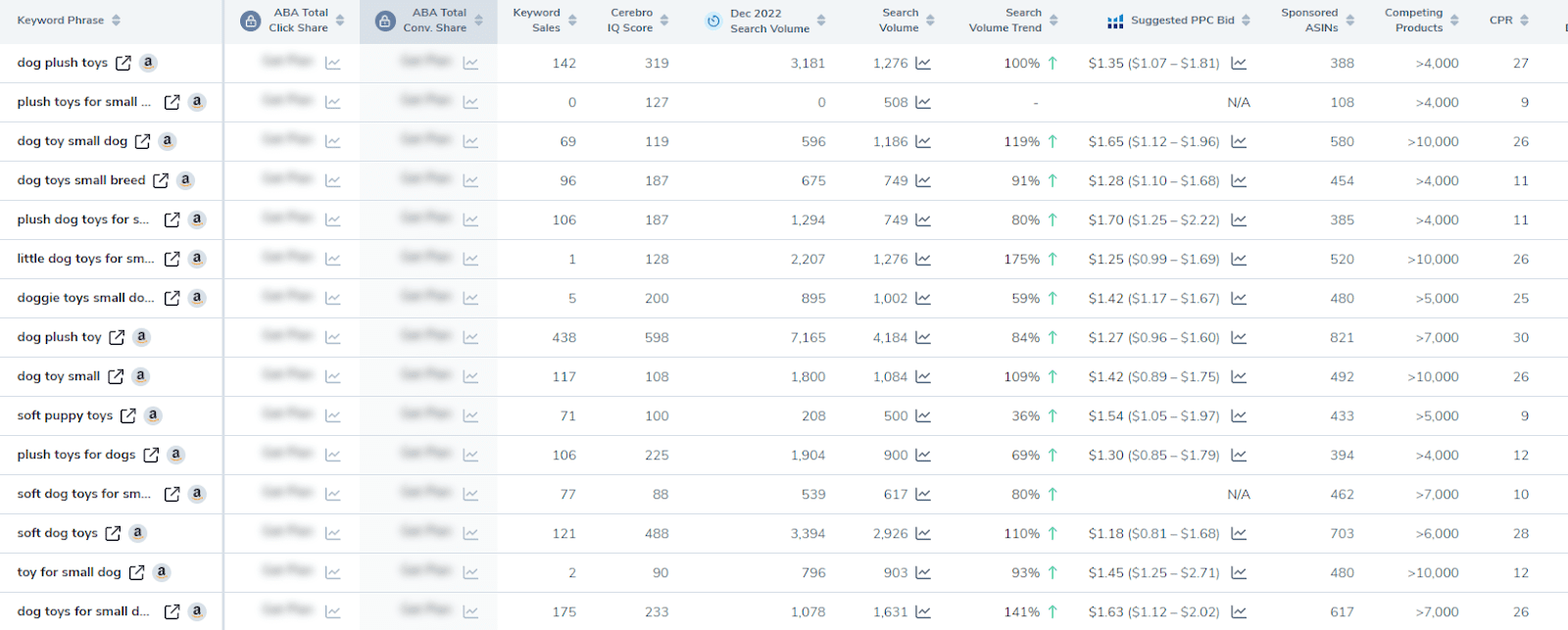
For best practices, you can check the historical trends of these keywords to observe the seasonality of the past 24 months.
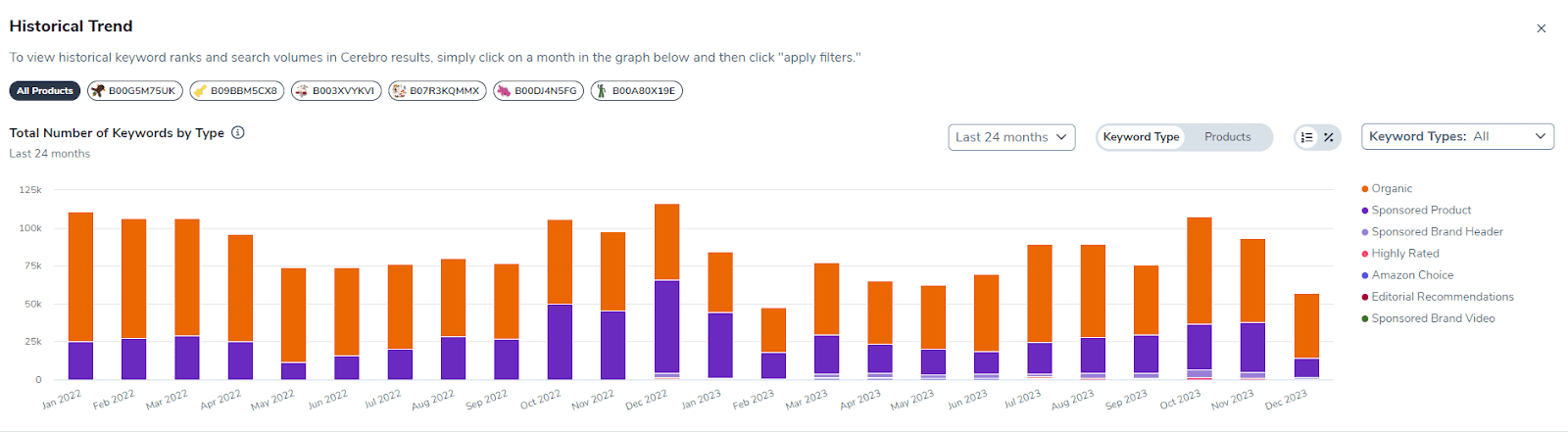
My Verdict: Cerebro provides you with a list of keywords that are actually performing for top sellers on Amazon. While Magnet lists out potential keywords from a seed keyword, Cerebro eliminates all the guesswork by offering you a list of relevant and ranking keywords. So it is better to use Magnet and Cerebro side by side to extract keywords for better product ranking and conversion.
4. Listing Builder – AI-powered Listing Builder
Creating optimized Amazon listings is crucial for ranking on the first page and triggering those magical Buy Box sales. However, manually researching keywords and crafting compelling titles, bullets, descriptions, and backend search terms can be incredibly tedious and time-consuming.
That’s why Helium 10 offers an AI-powered Listing Builder to automate the creation of SEO-friendly, high-converting product listings.
Simply enter your main product keywords, and Listing Builder will generate a complete draft listing pulling in synonyms, related keywords, and relevant features for your niche.
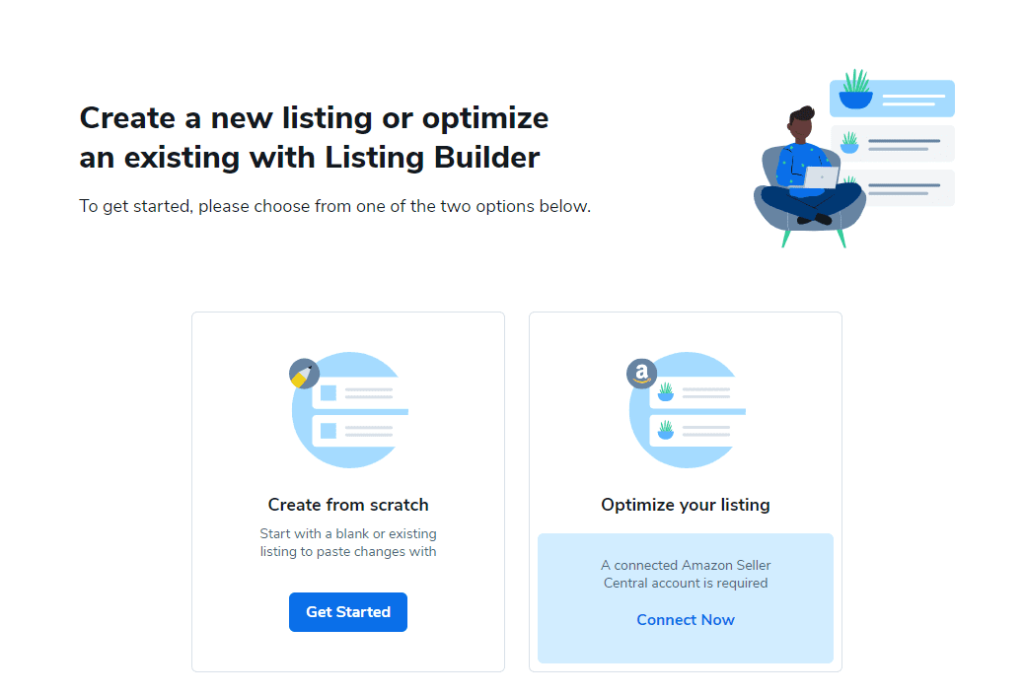
With Listing Builder, you can either create a listing from scratch or optimize your existing listing with its powerful AI assistance.
You don’t have to be very pro to create a listing from the very beginning. You can find a competitor’s listing and use suggestions from the tool to create a new one.
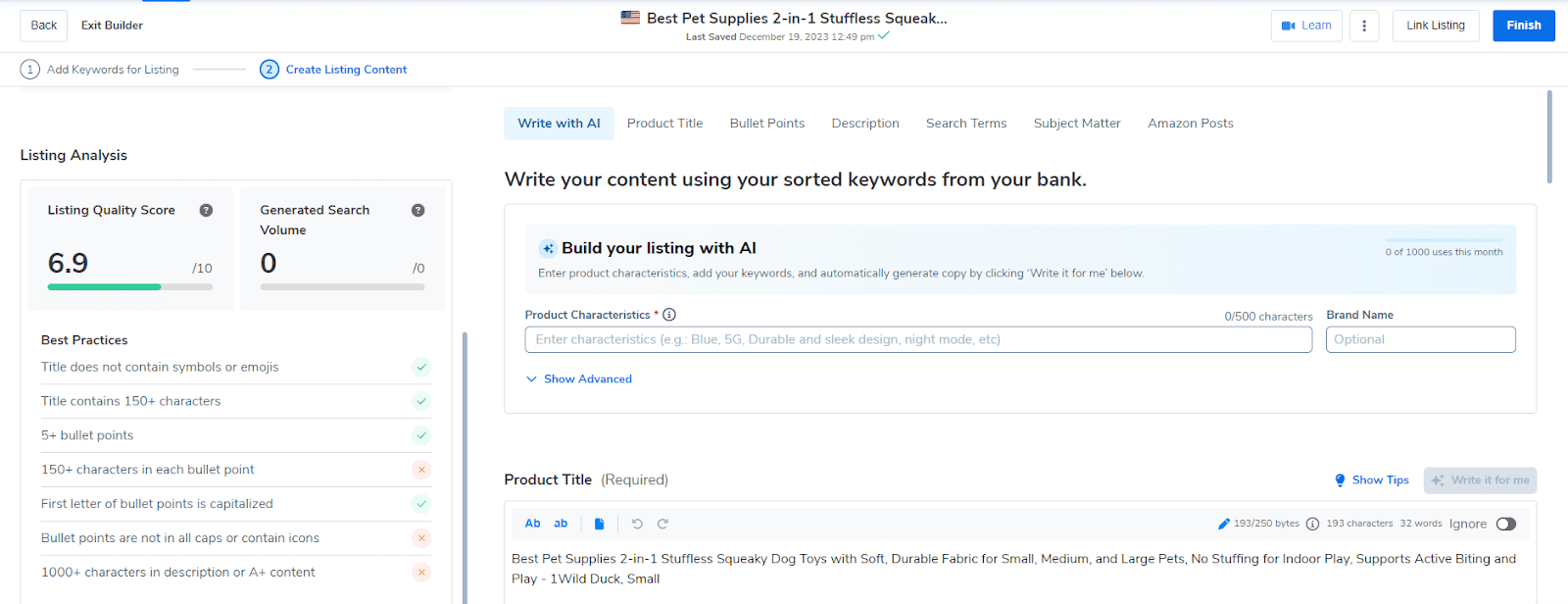
You can create an SEO-optimized listing with a better Listing Quality Score by adding your keywords and following the best practices.
You can then customize the AI-generated listing further or use it as a framework to build off of. Listing Builder cuts the time to create listings in half while ensuring every component is fully optimized.
My Verdict: Listing Builder undoubtedly helps you create a listing from scratch, but I found it useful for sellers who already have a listing on Amazon. The tool examines the indexed listings and suggests key areas for improvement that you can optimize using AI assistance and competitor analysis.
5. Scribbles – Listing Optimizer
Once your listings are up and running, you need to monitor their visibility and keyword rankings to maximize organic traffic. Scribbles makes this easy by creating tracking links to check your listings’ positions for target keywords with a single click.
Rather than running manual searches and decoding Amazon’s code, Scribbles checks rankings for unlimited keywords across all your listings. Easy-to-interpret reports allow you to identify optimization opportunities to improve visibility over time.
First, you can upload the keywords from your list. The tool will categorize the keywords in different colors, displaying common and most-used keywords.
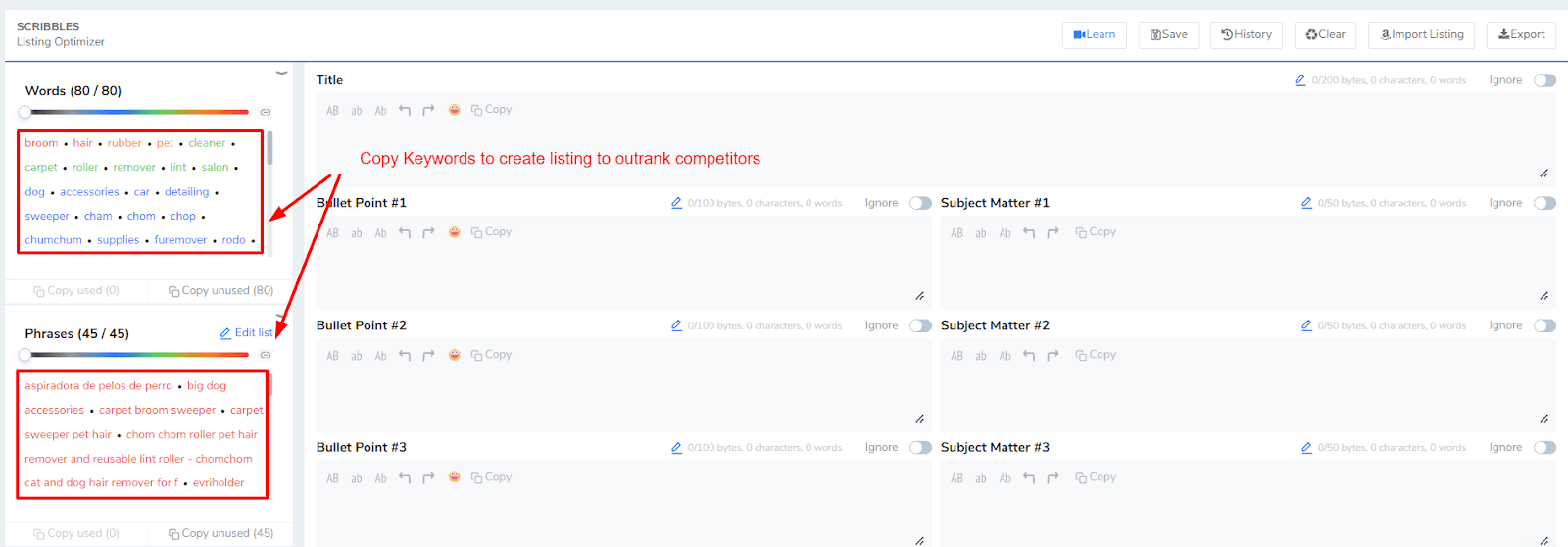
You can simply write the title, description, and bullet points wisely using the keywords on the left. It will also show how many times you have used a specific keyword. Compare the competitors’ listings and check how often they have used top-ranking keywords. This way, you will not overstuff keywords and phrases.
My Verdict: I found Scribbles extremely useful when it comes to creating a rank-worthy listing from scratch. However, Scribbles can be way too advanced for new sellers. So it is recommended to go through tutorials before creating a new listing to index on Amazon.
6. Alerts – Product Monitoring
When managing an Amazon business, it’s essential to monitor your listings at all times to catch issues immediately. Helium 10 Alerts does this monitoring for you 24/7.
Alerts track all your product listings and send notifications if anything looks suspicious. It will alert you about changes made in listing details, inventory issues, review anomalies, buy box status losses, and more so you can take action ASAP.
With Alerts enabled, you have complete visibility into the health of your Amazon presence without daily manual checks. Alert customization also allows you to specify alerts for the specific events that matter most.
7. Follow-Up – Email Automation Tool
Driving reviews and feedback is critical for social proof, conversion rate lifts, and achieving the Amazon’s Choice designation. Yet, constantly messaging customers is tedious and difficult to scale.
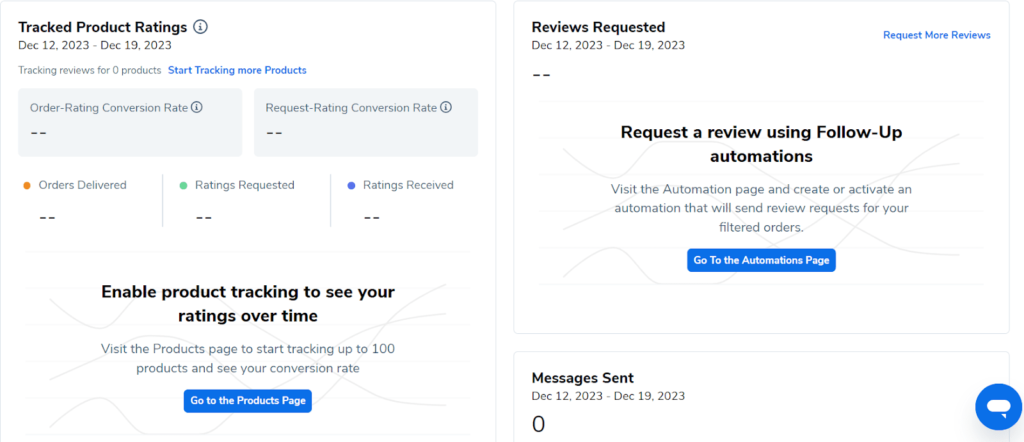
Helium 10’s Follow-Up tool solves this through customizable email automation sequences. Easily create multi-message campaigns targeted to all buyers, reviewers, non-reviewers, and more with dynamic merge fields to trigger responses.
Follow-up integrates directly with your Amazon order data to segment customers and deploy timely, relevant messages, driving more reviews, feedback, and repeat purchases over time.
8. Helium 10 Ads – Amazon Advertising Platform
Sponsored ads are essential for profitability on Amazon. They allow you to steal market share from competitors and sustain visibility even for ultra-competitive keywords.
Previously known as Adtomic, Helium 10 Ads provides a robust platform for launching and optimizing PPC campaigns directly tied to your product catalog and existing organic rankings. Automatic targeting based on your listings ensures your ads are shown for all relevant search queries where you can rank.
Once you connect your seller account, your running campaigns will open. You can add new campaigns and set rules based on facts like target audience, positive keywords, and negative keywords.
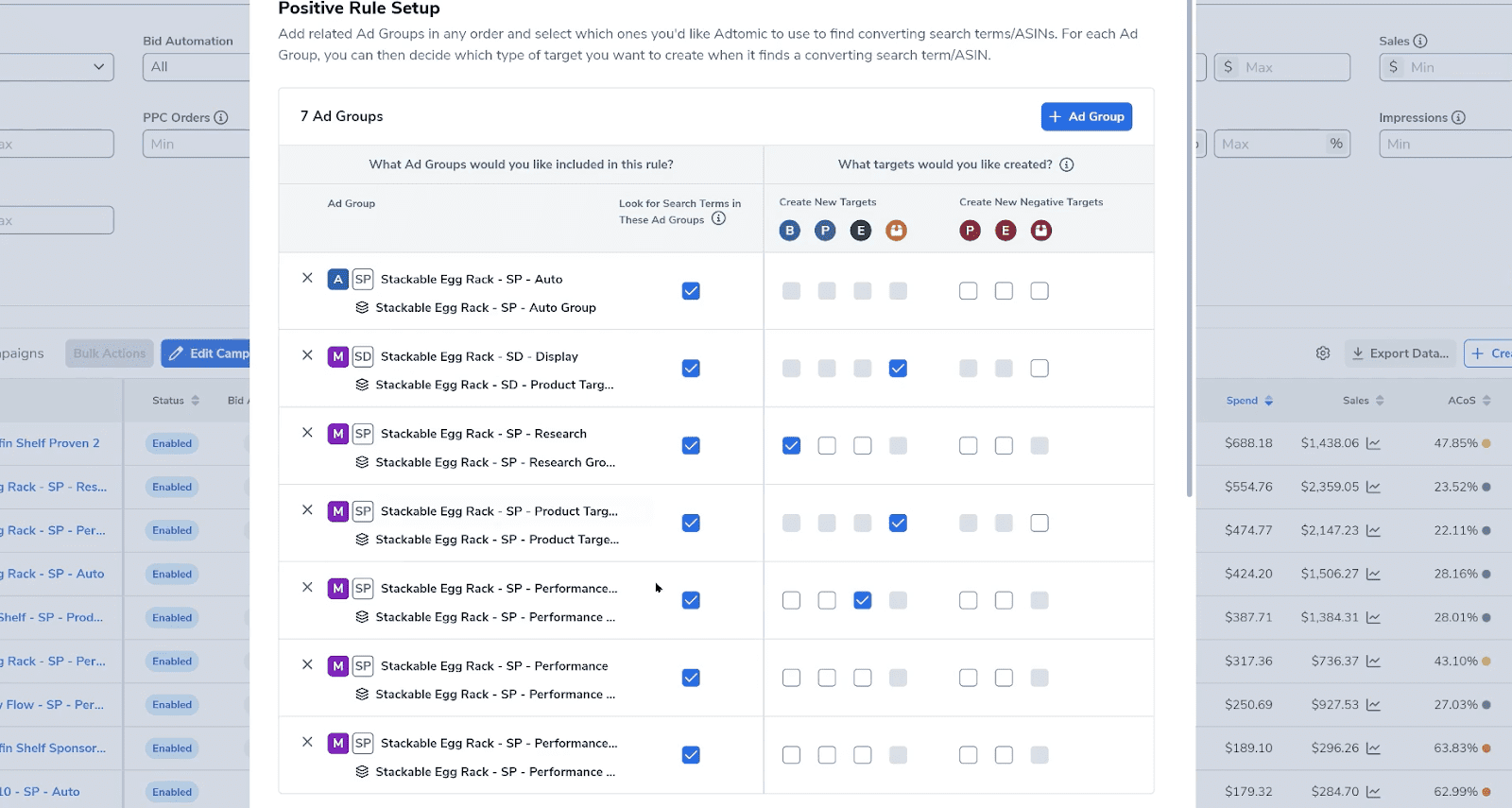
These real-time analytics then allow you to identify winning keywords to scale up and waste keywords to pause or remove.
Ads tool combines automation with manual controls so you can set campaigns and let its AI optimize or control bids yourself for each term. Either way, it’s the ultimate advertising toolkit exclusive to Helium 10 users.
My Verdict: With Ads tool, you can create custom rules for bidding, automation, and PPC optimization. The tool is great and now comes a part of Platinum and Diamond plans. Previously it was available at $199/month as an addon.
9. Add Amazon Listing to Your TikTok Shop
Helium 10 recently started supporting TikTok Shop. Now, you can easily copy your Amazon listing and paste it to TikTok Shop with a single click.

What’s more interesting about this feature is that it automatically adapts the format, which saves you a lot of time doing it manually. You can add a single listing or convert your entire catalog in bulk.
10. Freedom Ticket – Learn All About FBA
Selling successfully on Amazon involves mastering many interconnected skills, including account setup, product listing, shipping logistics, advertising, customer service, accounting, and much more. Even for experienced e-commerce sellers, it can be completely overwhelming.
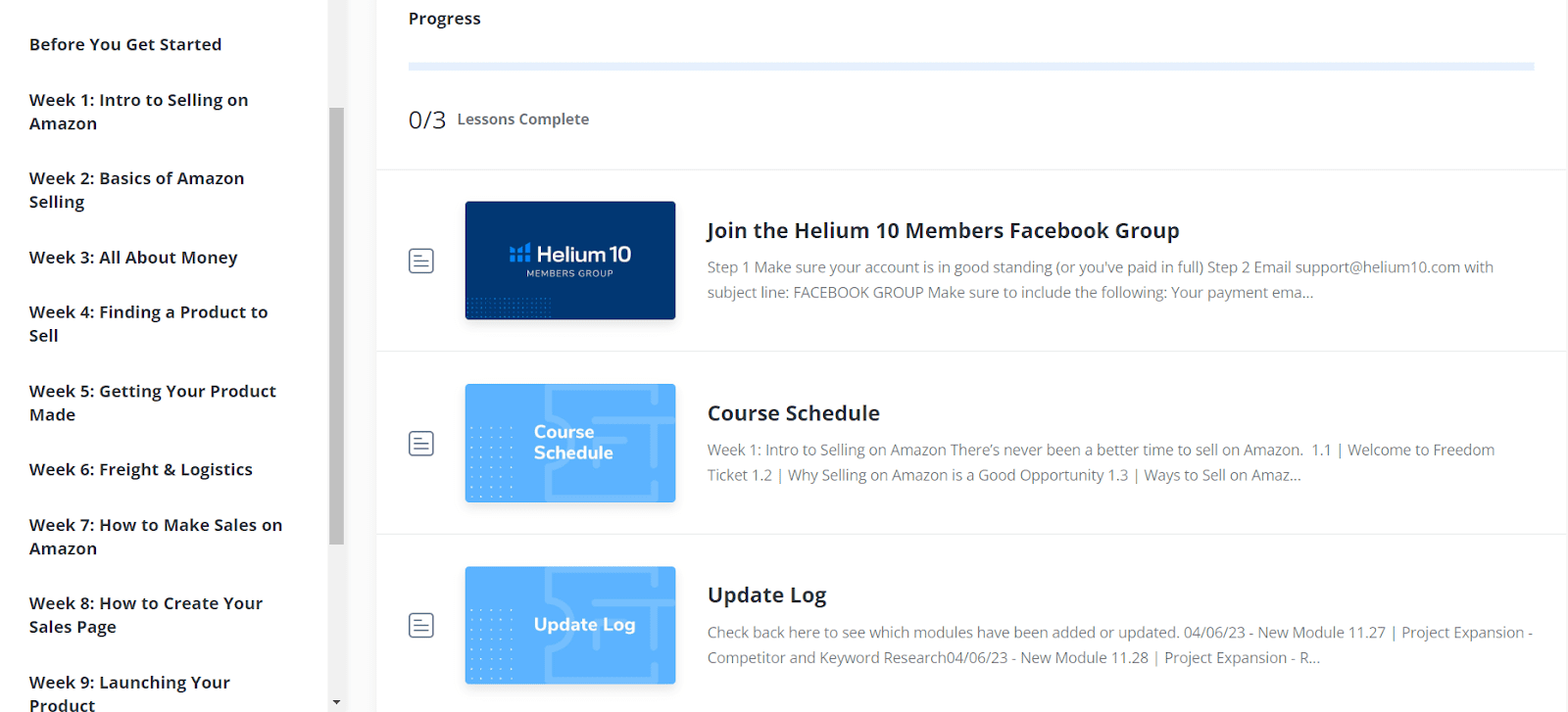
That’s why Helium 10 offers Freedom Ticket, the ultimate video course on building a profitable FBA business from absolute scratch.
Freedom Ticket provides over 70 hours of step-by-step training on the entire process, covering every single aspect in an easy-to-follow format.
As you work through each component, you’ll have the confidence to make each FBA decision successfully, having learned from 7-figure Amazon sellers themselves. Freedom Ticket eliminates the steep learning curve, so anyone can use Helium 10 to conquer FBA.
My Verdict: Freedom Ticket is an excellent starting point for aspiring FBA sellers. I have also learned a lot from this updated course. I highly recommend going through this tool if you don’t want to miss anything important, especially for beginners launching their first product.
11. Helium 10 Customer Support
Helium 10 offers customer support through live chat, email, and a request form. Live chat provides the fastest response, while email and the request form allow for more detailed inquiries.
The company also maintains a Help Center for self-service. Users generally find the support team knowledgeable and helpful, though response times can vary. While Helium 10 lacks phone support, its customer service is generally well-regarded.
Users are advised to utilize the Help Center first and provide detailed information when contacting the team to get the most out of their support.
What Else Is Included In the Helium 10 Suite?
I’ve covered the major features, but Helium 10 offers even more tools to streamline your Amazon business:
- Inventory Management: The Inventory Management tool makes it easy to track stock levels, set reorder points, and forecast future inventory needs.
- Refund Genie: Refund Genie automatically audits and claims reimbursements for lost or damaged inventory in Amazon’s warehouses.
- Managed Refund Services: If you have lost a lot of money due to damaged products, shipping mistakes, and other reasons, Helium 10 will help you recover all the refunds without needing to fill out paperwork and wait for months. Helium 10 will take care of all the aspects, but will charge 15% of the recovery amount.
- Index Checker: This innovative tool ensures your products are indexed for important keywords to improve visibility.
- Listing Analyzer: Compare your listings to top competitors and get actionable optimization tips with Listing Analyzer. This can be your go-to tool if you want to get an edge over your competitors.
- Profit Calculator: Profit Calculator is a part of the Helium 10 Chrome extension. It helps you calculate profit margins if you decide to sell a product among multiple sellers.
What is Helium 10 Chrome Extension?
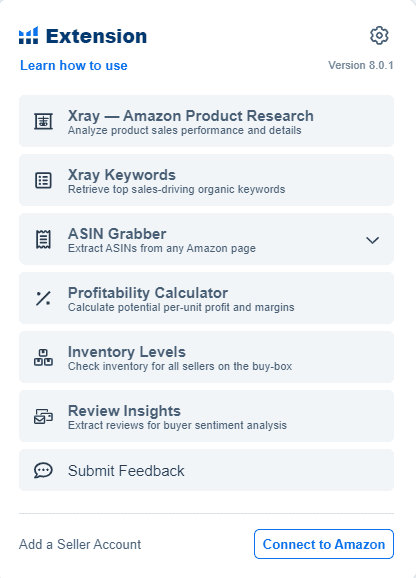
Helium 10 offers a free Chrome extension – the main attraction of this Amazon seller suite. The Chrome extension conveniently uses the Xray tool to find products and keywords for sellers smartly.
The best part about the Helium 10 extension is that you don’t have to copy ASINs separately to the web app to extract sales data from Amazon.
It smartly scans the product page and lines up all the ASINs on the page and their key metrics, such as sales volume, pricing, BSR, reviews, and ratings.
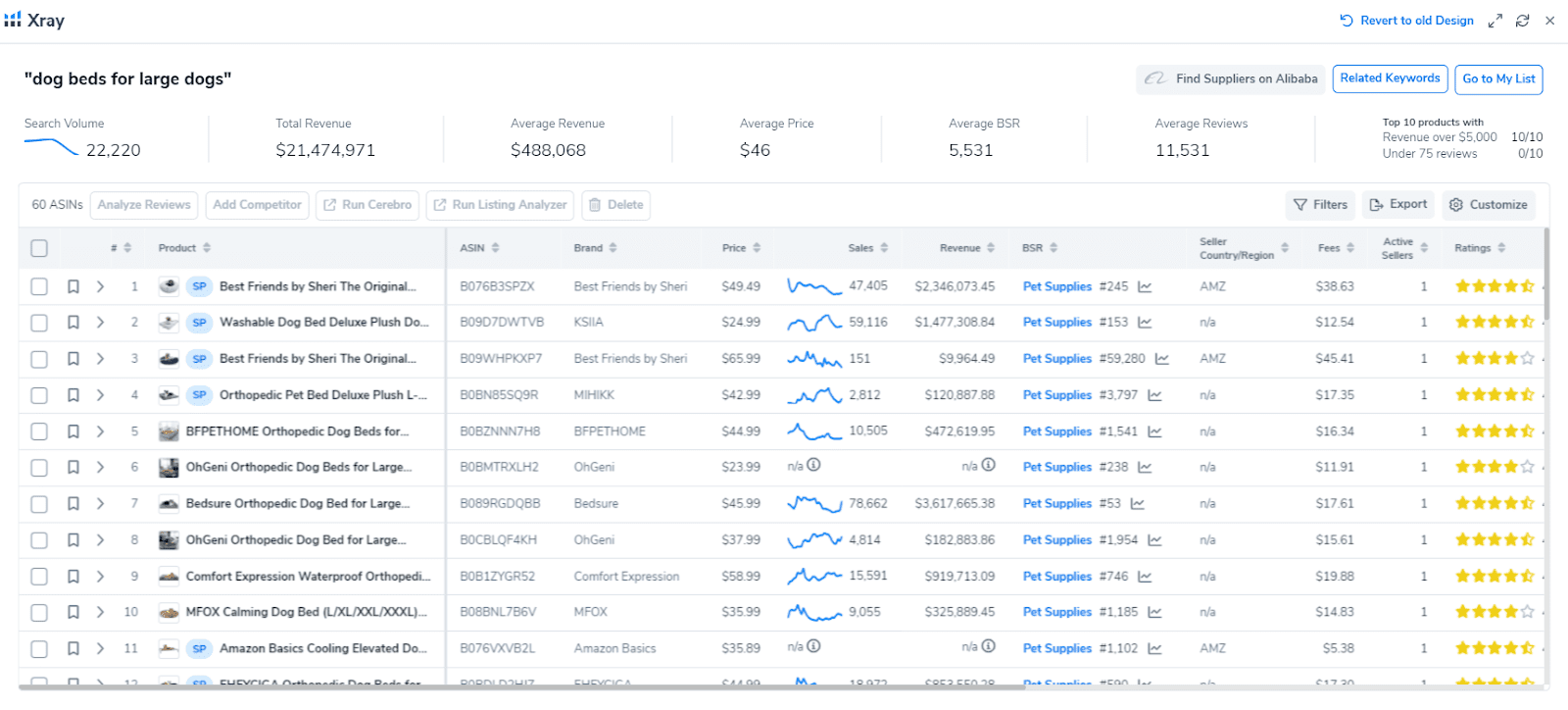
Apart from the Xray tool, you can also use other tools like Profitability Calculator, ASIN Grabber, and Review Insights while browsing on the product page.
Helium 10 Academy
Helium 10 Academy is a free online training program led by experts and professional FBA sellers from Helium 10. This free course covers all the core topics like product research, keyword research, listing optimization, marketing, and other operations using the Helium 10 tool suite.
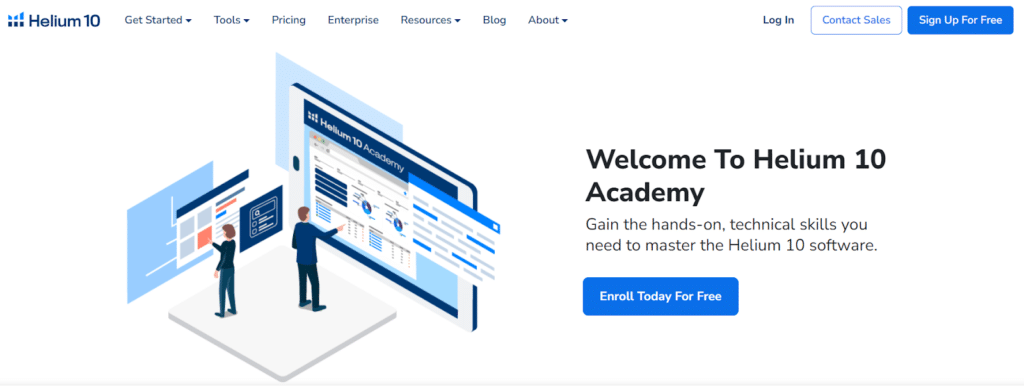
The Academy is structured to educate new sellers from the beginning with comprehensive articles, video lessons, and downloadable resources. The course is completely self-paced, so you can take your time and go through every process step-by-step.
Apart from using Helium 10 tools, the Academy provides best practices and proven strategies to create a successful FBA business on Amazon. You can also get a certificate once you complete the course. However, you will need to pay a one-time fee of $77 to take the certification exam.
What About Helium 10 Pricing?
Helium 10 recently made very big changes in its pricing plan in 2026 . There is no beginner-level plan and the free plan has been removed.
So, before going directly for the premium plans, I would suggest new sellers try the Helium 10 Free trial to learn and test all the major features.

The main plans are Platinum and Diamond, which you can purchase on a monthly and yearly basis.
| Helium 10 Plans | Monthly Price | Annual Price |
|---|---|---|
| Platinum | $129/month | $99/month |
| Diamond | $359/month | $279/month |
If you are planning to start with Helium 10, use our coupon codes: DEMANDSAGE10 and DEMANDSAGE20 to save more on monthly plans.
Here’s how our coupon codes work:
DEMANDSAGE10 – Gives you a flat 10% discount on monthly plans. It works on both plans, and you can use it indefinitely.
DEMANDSAGE20 – This coupon gives you a 20% discount on monthly plans for the first 6 months.
Every plan comes with certain limitations and accessibility. So read the complete breakdown of all the plans in our comprehensive Helium 10 pricing guide.
Helium 10 Refund Policy
Helium 10 offers a 7-day money-back guarantee for new users. If you’re not satisfied with the service within the first week, you can request a full refund. This policy applies to your first subscription payment only.
Keep in mind that refunds are not available for any add-ons or additional services purchased separately.
Helium 10 Free Trial
Helium 10 offered a free plan for a long time but they removed it along with the Starter plan. They did offered a limited promotion of 7 days free trial on Diamond plan but switched back to free plan, which is not currently unavailable too.
However, those who are already signed up for the free plan before can use the Chrome extension and basic tools with restriction.
What Customers Say About Helium 10?
Helium 10 is the runaway first choice among top Amazon experts, seven-figure sellers, and bestselling authors. But you don’t have to take my word for it.
Check the Helium 10 reviews and ratings of the platform:
- Trustpilot: 3.2 stars (600+ reviews)
- G2: 4.2 stars (160+ reviews)
- Capterra: 4.3 stars (100+ reviews)
Here’s what existing users say about Helium 10:

“I have been working with Helium10 for the past 3 years, and I can honestly say that I wouldn’t have been able to do anything without them. As an Amazon Agency, you need to have accurate and up-to-date data to be able to help your Partners grow, and Helium10 has all the tools you need from Keyword Research to Market Insights. Great Customer Service, too!”

“I think helium10 is a user-friendly software for product hunting. I have been using this software for my hunting for 3 years. This software helps me a lot; I have launched products with the help of Helium 10, and I probably couldn’t have done it without H10. I got the same sales as helium10 shows during hunting. This software has exact calculations for sales for any products, reviews, Sales Rank, and other things.”
Helium 10 Alternatives
Helium 10 is the first choice for ultimate Amazon sellers. However, sellers prefer other tools due to their higher pricing and steep learning curve.
Jungle Scout, Viral Lunch, and AMZScout are top competitors when it comes to providing similar features.
Let’s take a close at the Helium 10 alternatives:
Bonus: Find out about other top competitors in our Helium 10 alternatives, which explore different tools for sellers with different Amazon business needs.
Helium 10 Pros & Cons
Let me unwind a few pros and cons of Helium 10 I found out while testing the tool. In addition to my experience, I have also mentioned common drawbacks that other users have complained about.
Final Verdict: Helium 10 Is One of The Best Amazon Seller Tools In 2026
As we wrap up our journey through Helium 10’s features and capabilities, one thing is clear: this tool packs a serious punch for Amazon sellers. From its unparalleled product research tools to its AI-powered listing optimization, Helium 10 offers a comprehensive suite that can truly transform your Amazon business.
Is it perfect? No tool is. The learning curve can be steep, and the higher-tier plans might stretch some budgets. However, for sellers serious about scaling their Amazon presence, the potential ROI is hard to ignore.
I suggest you take Helium 10’s 7-day free trial before purchasing a paid subscription. If you do decide to purchase a plan, remember to take advantage of our Helium 10 coupons.
If you are still confused about Helium 10, feel free to drop your queries in the comments and I’ll be happy to assist you!